Embarking on the journey of refactoring your old projects isn’t just about cleaning up code; it’s a powerful statement of your growth as a developer. This guide, “How to Refactor Your Old Projects to Show Your Growth,” delves into the art of transforming outdated code into a showcase of your evolving skills and expertise. We’ll explore the essential steps, from assessing the current state of your projects to highlighting the impressive results, all while demonstrating how refactoring can significantly boost your career and enhance your professional portfolio.
This comprehensive guide will walk you through each stage of the refactoring process. We will dissect the objectives, evaluate your project’s current standing, and select the most appropriate strategies to achieve the desired outcome. Furthermore, we’ll equip you with the knowledge to plan, execute, and present your refactored projects, showcasing your dedication to code quality and your ability to adapt to new technologies.
Get ready to revitalize your old projects and witness the transformation of your coding abilities!
Understanding the Goal: Refactoring for Growth
Refactoring old projects isn’t just about making code cleaner; it’s a powerful tool for demonstrating your growth as a developer. It’s a chance to revisit past work, identify areas for improvement, and showcase your evolving skills. This process allows you to learn from your mistakes, embrace new technologies, and present a polished portfolio to potential employers or clients.
Primary Objective of Refactoring Old Projects
The primary objective is to enhance the codebase’s maintainability, readability, and efficiency. This involves restructuring the code without altering its external behavior. By doing so, you aim to reduce technical debt, improve performance, and make the code easier for yourself and others to understand and modify in the future. This objective directly contributes to long-term project sustainability and reduces the risk of future errors or performance bottlenecks.
Defining ‘Growth’ in Refactoring
Growth in this context encompasses several key areas:
- Skill Development: You are constantly learning new programming languages, frameworks, and design patterns. Refactoring allows you to apply these new skills to older projects, demonstrating your ability to learn and adapt. For instance, if you initially used a simple approach to data validation, you could refactor to use a more robust library or a more sophisticated validation strategy, showcasing your progress in these areas.
- Knowledge Expansion: Refactoring provides an opportunity to deepen your understanding of software design principles, testing methodologies, and code optimization techniques. Revisiting old code and identifying opportunities to improve its structure or efficiency can be a powerful learning experience.
- Code Quality Improvement: Refactoring leads to cleaner, more readable, and more maintainable code. This means fewer bugs, easier debugging, and a lower likelihood of introducing new issues when making changes. This is achieved by applying best practices such as following SOLID principles, reducing code duplication, and improving the overall structure of the project.
- Problem-Solving Ability: Each refactoring task is a problem-solving exercise. You analyze the existing code, identify areas for improvement, and implement solutions. This process strengthens your ability to approach complex problems systematically and efficiently.
Demonstrating Evolving Abilities to Employers and Clients
Refactoring projects, especially those available in a public repository like GitHub, offer tangible evidence of your growth.
- Portfolio Enhancement: A well-refactored project in your portfolio showcases your skills and attention to detail. It demonstrates that you’re not just a coder but a thoughtful developer who cares about the quality and longevity of their work.
- Clearer Communication: Improved code readability makes it easier for potential employers or clients to understand your work. Well-structured code communicates your ideas more effectively than poorly organized code.
- Technical Skill Demonstration: Refactoring demonstrates your familiarity with current best practices, design patterns, and technologies. If you’ve refactored an older project to use a newer framework or library, that’s a direct indication of your learning and adaptability.
- Proactive Approach: Taking the initiative to refactor old projects shows that you are proactive and dedicated to continuous improvement. This is a highly valued trait in the software development industry.
By refactoring, you essentially turn your old code into a living resume, constantly updating and reflecting your current abilities.
Assessing the Current State
Before diving into refactoring, a thorough assessment of your old project is crucial. This initial evaluation provides a roadmap, helping you identify areas that need attention and prioritize your efforts effectively. This phase involves understanding the project’s current state, pinpointing weaknesses, and formulating a plan for improvement.
Initial Steps in Project Evaluation
The first step involves gathering information about the project’s current status. This includes understanding the project’s history, its intended functionality, and any existing documentation.
- Reviewing Documentation: Start by examining any available documentation. This may include design documents, user manuals, API specifications, and any comments within the code. This documentation will help you understand the project’s original goals, architecture, and the intended functionality of different components. If the documentation is outdated or missing, make a note of this; it’s a sign of a potential problem.
- Understanding the Codebase: Spend time navigating the codebase. Familiarize yourself with the directory structure, the main classes and functions, and how different parts of the system interact. Use tools like code search and cross-referencing to understand the flow of execution and dependencies.
- Running the Project: Ensure the project compiles and runs correctly. Test its core functionalities to understand its behavior and identify any immediate issues. If the project doesn’t run or has obvious bugs, this is a critical red flag that should be addressed early in the refactoring process.
- Analyzing Build and Deployment Processes: Examine the build process (e.g., using tools like Maven, Gradle, or make) and the deployment process. Understanding how the project is built, tested, and deployed is crucial for making changes and ensuring that your refactoring efforts don’t break the system. Identify any areas where the process can be streamlined or automated.
Identifying Areas for Improvement
Once you have a general understanding of the project, the next step is to identify areas that can be improved. This involves looking for code smells, performance bottlenecks, and outdated technologies.
- Code Smells: Code smells are indicators of deeper problems in the code. They don’t necessarily cause immediate errors, but they make the code harder to understand, maintain, and extend. Common code smells include:
- Duplicated Code: The same code appearing in multiple places. This increases the chances of errors and makes changes more difficult.
- Long Methods/Functions: Methods that are too long and do too much. They become difficult to understand and maintain.
- Large Classes: Classes that have too many responsibilities. They become difficult to understand and often have many dependencies.
- Feature Envy: A method that seems more interested in the data of another class than its own.
- Data Clumps: Groups of data that are often passed around together.
Tools like SonarQube or static analysis tools built into your IDE can help identify code smells automatically.
- Performance Bottlenecks: Identify areas where the project is slow or inefficient. This could include slow database queries, inefficient algorithms, or poorly optimized code. Performance testing tools can help pinpoint these bottlenecks.
For example, using profiling tools like Java VisualVM (for Java applications) or the Performance tab in Chrome Developer Tools (for web applications) can reveal slow-running methods or processes.
- Outdated Technologies: Assess whether the project uses outdated frameworks, libraries, or programming languages. Using outdated technologies can lead to security vulnerabilities, lack of support, and limited functionality.
- Frameworks: Outdated frameworks may lack security patches and updates.
- Libraries: Old libraries may not be compatible with newer technologies.
- Programming Languages: Using older versions of programming languages might restrict access to modern features and improvements.
- Security Vulnerabilities: Check for security vulnerabilities, such as SQL injection, cross-site scripting (XSS), and insecure dependencies. Use security scanning tools to identify potential risks. Keeping dependencies up-to-date is essential for addressing security vulnerabilities.
- Test Coverage: Evaluate the existing test coverage. A lack of tests or inadequate test coverage makes it difficult to refactor code safely. Aim for a high level of test coverage to ensure that changes don’t break existing functionality.
Prioritizing Refactoring Tasks
Once you’ve identified areas for improvement, you need to prioritize them. This involves assessing the impact of each issue and the risk associated with refactoring it.
- Impact Assessment: Determine the potential impact of each issue. Consider how the issue affects:
- Performance: Does the issue slow down the application?
- Maintainability: Does the issue make the code harder to understand or modify?
- Scalability: Does the issue limit the application’s ability to scale?
- Security: Does the issue introduce security vulnerabilities?
- User Experience: Does the issue affect the user experience?
- Risk Assessment: Evaluate the risk associated with refactoring each issue. Consider:
- Complexity: How complex is the refactoring?
- Dependencies: How many other parts of the system depend on the code being refactored?
- Test Coverage: How good is the test coverage for the code being refactored?
- Potential for Bugs: What is the likelihood that the refactoring will introduce new bugs?
- Prioritization System: Create a system for prioritizing refactoring tasks. One common approach is to use a matrix that plots impact against risk.
Illustration: Imagine a 2×2 matrix. The horizontal axis represents the “Risk Level” (Low to High), and the vertical axis represents the “Impact Level” (Low to High).
- High Impact, High Risk: These tasks should be approached with caution. They require careful planning, thorough testing, and possibly a phased approach. They might involve breaking down the task into smaller, more manageable steps.
- High Impact, Low Risk: These are high-priority tasks. They can have a significant positive impact with relatively little risk.
- Low Impact, High Risk: These tasks should generally be avoided unless absolutely necessary. The risk outweighs the potential benefits.
- Low Impact, Low Risk: These tasks can be deferred or tackled when time permits. They are not critical but can contribute to overall code quality.
This matrix provides a visual guide for decision-making, helping to balance the need for improvement with the potential for disruption.
- Iterative Approach: Refactoring should be an iterative process. Start with the highest-priority tasks and refactor in small, manageable steps. Regularly test your changes and ensure that the project continues to function as expected. This approach helps to minimize risk and allows you to make progress incrementally.
Choosing the Right Approach: Refactoring Strategies
Refactoring, while beneficial, requires careful planning. Selecting the appropriate strategy is crucial for a successful and manageable transformation of your old projects. This section explores various refactoring methodologies and techniques, equipping you with the knowledge to make informed decisions.
Comparing Refactoring Methodologies
Choosing the right refactoring methodology depends heavily on the project’s size, complexity, and the team’s experience. Let’s examine a few popular approaches.
- Boy Scout Rule: This is a proactive and incremental approach. The core principle is to “leave the campground cleaner than you found it.” Whenever you touch a piece of code, refactor it slightly to improve its readability and maintainability, even if it’s not directly related to the task at hand. This builds a culture of continuous improvement.
- Big Bang Refactoring: This involves a large-scale, all-at-once refactoring effort. It’s often employed when a project has accumulated significant technical debt and needs a complete overhaul. It involves significant risks because it can introduce many bugs at once and is difficult to manage.
- Incremental Refactoring: This strategy breaks down the refactoring process into smaller, manageable steps. It’s a safer approach than Big Bang because it allows you to test and validate changes frequently. This method is often preferred for large projects and allows you to focus on specific areas of the code base over time.
Common Refactoring Techniques
Refactoring involves various techniques to improve code quality. The choice of technique depends on the specific code smells and the desired outcome.
- Extracting Methods: This involves taking a block of code and moving it into a separate method. This improves readability by giving a name to a specific operation and reducing code duplication.
- Renaming Variables: Changing the names of variables to be more descriptive and understandable. This makes the code easier to follow and reduces the cognitive load on developers. For instance, renaming `x` to `userAge` clarifies the variable’s purpose.
- Removing Dead Code: Eliminating code that is no longer used or reachable. This simplifies the codebase and reduces the potential for confusion.
- Extracting Classes: This involves creating new classes from existing code, often to represent related data and behavior. This improves code organization and promotes the Single Responsibility Principle.
- Moving Features Between Classes: Reorganizing code by moving features to more appropriate classes. This ensures each class focuses on a specific responsibility.
- Simplifying Conditional Logic: Refactoring complex `if-else` statements and nested conditions to make the logic easier to understand and maintain. For instance, using polymorphism or the Strategy pattern can often simplify complex conditional structures.
Refactoring Strategy Comparison Table
The following table summarizes the pros and cons of the different refactoring strategies.
| Strategy | Description | Pros | Cons |
|---|---|---|---|
| Boy Scout Rule | Incremental refactoring performed whenever code is touched. |
|
|
| Big Bang | Large-scale refactoring performed all at once. |
|
|
| Incremental | Refactoring performed in small, manageable steps. |
|
|
Planning and Preparation: Before You Begin
Refactoring is a journey, and like any journey, it requires careful planning. Before you start making changes to your codebase, you need to lay the groundwork to ensure a smooth and successful process. This phase is all about minimizing risk and maximizing the chances of a positive outcome. Let’s dive into the crucial steps involved in preparing for refactoring.
Importance of Version Control and Branching Strategies
Version control, particularly using systems like Git, is absolutely critical when refactoring. It allows you to track changes, revert to previous states if something goes wrong, and collaborate effectively with others. Branching strategies further enhance this, enabling isolated development and experimentation.
Here’s why version control and branching are essential:
- Tracking Changes: Every change you make is recorded, allowing you to understand the evolution of your code and revert to previous working versions if needed. This is a safety net that prevents you from getting permanently stuck with broken code.
- Collaboration: Git facilitates collaboration by allowing multiple developers to work on the same codebase concurrently without stepping on each other’s toes.
- Experimentation: Branching allows you to experiment with refactoring techniques in isolation. You can create a branch, make changes, test them thoroughly, and then merge the changes back into the main branch (e.g., `main` or `master`) if they are successful. If not, you can simply discard the branch without affecting the main codebase.
- Rollback Capability: If a refactoring effort introduces bugs or performance issues, you can easily revert to a previous, known-good state.
A common and effective branching strategy is the Gitflow workflow. This strategy uses several branches:
- `main` (or `master`): Represents the production-ready code.
- `develop`: The integration branch where features are merged.
- `feature/*`: Branches for developing new features or, in this case, for refactoring specific parts of the code.
- `release/*`: Branches for preparing releases.
- `hotfix/*`: Branches for quickly patching production code.
Using Gitflow ensures that refactoring efforts are isolated and that the `main` branch remains stable. When refactoring, you would typically create a `feature/*` branch for the specific area you’re working on. After completing and testing the refactoring, you’d merge the branch into `develop` and eventually into `main` after thorough review and testing.
Setting Up a Testing Framework
A robust testing framework is non-negotiable when refactoring. It provides confidence that your changes haven’t broken existing functionality and that the refactored code behaves as expected. Tests act as a safety net, allowing you to refactor with confidence.
Here’s how to approach setting up a testing framework:
- Choose a Framework: Select a testing framework that is appropriate for your programming language and project type. Popular options include JUnit (Java), pytest (Python), Jest (JavaScript), and others.
- Write Unit Tests: Unit tests focus on testing individual components or functions in isolation. They verify that each part of your code works as intended. This is the most fundamental type of testing.
- Write Integration Tests: Integration tests verify that different parts of your code work together correctly. They test the interaction between components.
- Write End-to-End Tests (E2E): E2E tests simulate user interactions with your application, testing the entire system from start to finish. These tests are more complex but provide a high level of confidence in the functionality of the application.
- Prioritize Test Coverage: Aim for high test coverage, meaning that a significant portion of your code is covered by tests. Tools exist to measure test coverage and identify areas that need more testing.
- Automate Testing: Integrate your tests into your development workflow, ideally by running them automatically every time you commit code or merge changes. Continuous Integration/Continuous Deployment (CI/CD) pipelines are excellent for this.
Example: Let’s say you are refactoring a function that calculates the sum of two numbers in Python. Your unit tests might include tests for:
- Adding positive numbers (e.g., `2 + 3 = 5`)
- Adding negative numbers (e.g., `-2 + -3 = -5`)
- Adding a positive and a negative number (e.g., `2 + -3 = -1`)
- Adding zero (e.g., `5 + 0 = 5`)
Before and after refactoring, run these tests to confirm the function still works correctly. If any tests fail after the refactoring, you know that something went wrong and you need to fix it before merging your changes.
Creating a Refactoring Plan
A well-defined refactoring plan provides a roadmap for your efforts, helping you stay organized and focused. It breaks down a complex task into smaller, manageable steps, making the process less daunting.
Here’s how to create a refactoring plan:
- Define the Scope: Clearly identify the specific areas of the codebase you intend to refactor. Avoid trying to refactor everything at once. Start with a manageable chunk.
- Set Goals: Determine the objectives of your refactoring. What improvements are you aiming for? (e.g., improved readability, performance, maintainability, testability).
- Break Down the Task: Divide the refactoring process into smaller, more manageable milestones. Each milestone should be a specific, achievable goal.
- Estimate Time: Estimate the time required for each milestone. Be realistic and add a buffer for unexpected issues.
- Prioritize Tasks: Decide the order in which you will tackle the milestones. Consider dependencies and the impact of each change. Start with the areas that are most critical or have the highest potential for improvement.
- Choose Refactoring Techniques: Based on the “Choosing the Right Approach: Refactoring Strategies” (covered previously), identify the specific refactoring techniques you will use for each milestone (e.g., Extract Method, Rename Variable, Move Method).
- Document the Plan: Create a document or a project management tool (like Trello, Jira, or even a simple spreadsheet) to track your progress. Include milestones, timelines, and the refactoring techniques you will use.
- Regularly Review and Adapt: Refactoring plans are not set in stone. As you progress, you may discover unforeseen challenges or opportunities. Regularly review your plan and adapt it as needed.
Example Refactoring Plan (Simplified):
Goal: Improve the readability and maintainability of a complex class responsible for handling user authentication.
- Milestone 1 (1 day): Extract a method from the class to handle user input validation.
- Milestone 2 (2 days): Rename confusing variables and methods to improve clarity.
- Milestone 3 (3 days): Create unit tests for the extracted method and the renamed variables.
- Milestone 4 (1 day): Refactor the class to use the extracted method and the new names.
- Milestone 5 (1 day): Review the code and merge the changes.
This plan breaks down the overall goal into smaller, achievable steps, making the refactoring process less overwhelming and easier to track. The estimated time allows you to monitor your progress and adjust your plan as needed.
Step-by-Step Refactoring
Refactoring involves making changes to the internal structure of code without altering its external behavior. It’s a crucial part of software development, helping to improve code quality, maintainability, and readability. This section provides a practical guide to refactoring, demonstrating the process with a specific code smell and highlighting the importance of testing.
Refactoring a Long Method
Long methods are a common code smell, indicating that a single function or method is trying to do too much. This makes the code harder to understand, test, and maintain. Refactoring a long method involves breaking it down into smaller, more focused methods.Let’s consider a simplified example in Python. Imagine a method `calculate_order_total` that calculates the total cost of an order, including discounts and shipping.“`pythondef calculate_order_total(order): total = 0 # Calculate subtotal for item in order.items: total += item.price
item.quantity
# Apply discount if order.discount_code: discount = get_discount(order.discount_code) total
= (1 – discount)
# Add shipping cost if order.shipping_address: total += calculate_shipping_cost(order.shipping_address) return total“`This method is lengthy and does multiple things. To refactor it, we can break it down into smaller, more specific methods.First, extract the subtotal calculation:“`pythondef calculate_subtotal(order): total = 0 for item in order.items: total += item.price
item.quantity
return total“`Next, extract the discount application:“`pythondef apply_discount(total, order): if order.discount_code: discount = get_discount(order.discount_code) total
= (1 – discount)
return total“`Finally, extract the shipping cost calculation:“`pythondef calculate_shipping(order): if order.shipping_address: return calculate_shipping_cost(order.shipping_address) return 0“`Now, the `calculate_order_total` method becomes:“`pythondef calculate_order_total(order): total = calculate_subtotal(order) total = apply_discount(total, order) total += calculate_shipping(order) return total“`This refactored version is much easier to understand and maintain.
Each method has a clear, single responsibility.
Writing Unit Tests Before and After Refactoring
Unit tests are essential for ensuring that refactoring doesn’t introduce bugs. They verify that the code’s behavior remains the same after the changes. Before refactoring, write tests that cover all the functionalities of the original method. After refactoring, run these tests to confirm that they still pass. Also, write new tests for the new methods.Before refactoring, create unit tests that verify the `calculate_order_total` method’s behavior.“`pythonimport unittestclass TestOrderTotal(unittest.TestCase): def test_no_discount_no_shipping(self): order = Order(items=[Item(price=10, quantity=2), Item(price=5, quantity=1)], discount_code=None, shipping_address=None) self.assertEqual(calculate_order_total(order), 25) def test_with_discount(self): order = Order(items=[Item(price=10, quantity=2)], discount_code=”SUMMER10″, shipping_address=None) # Assuming get_discount(“SUMMER10″) returns 0.1 (10% discount) self.assertEqual(calculate_order_total(order), 18) def test_with_shipping(self): order = Order(items=[Item(price=10, quantity=2)], discount_code=None, shipping_address=”Address”) # Assuming calculate_shipping_cost(“Address”) returns 5 self.assertEqual(calculate_order_total(order), 25)“`After refactoring, run these tests.
They should all pass. Also, write tests for the new methods like `calculate_subtotal`, `apply_discount`, and `calculate_shipping`.“`pythonclass TestSubtotal(unittest.TestCase): def test_subtotal_calculation(self): order = Order(items=[Item(price=10, quantity=2), Item(price=5, quantity=1)]) self.assertEqual(calculate_subtotal(order), 25)class TestDiscount(unittest.TestCase): def test_apply_discount(self): total = 100 order = Order(discount_code=”SUMMER10″) self.assertEqual(apply_discount(total, order), 90)class TestShipping(unittest.TestCase): def test_calculate_shipping(self): order = Order(shipping_address=”Address”) # Assuming calculate_shipping_cost(“Address”) returns 10 self.assertEqual(calculate_shipping(order), 10)“`These tests ensure that the refactored code behaves as expected.
Essential Tools and IDE Features for Refactoring
Various tools and IDE features significantly streamline the refactoring process. Utilizing these tools can save time and minimize the risk of introducing errors.
- Integrated Development Environments (IDEs): IDEs like IntelliJ IDEA, Eclipse, Visual Studio Code (with extensions), and PyCharm provide powerful refactoring capabilities. They automate tasks like renaming variables and methods, extracting methods, and inlining methods.
- Automated Refactoring Tools: These tools offer features such as “Extract Method,” “Inline Method,” “Rename,” “Move,” and “Change Signature,” which can be performed with a few clicks.
- Version Control Systems: Systems like Git are essential for tracking changes and reverting to previous versions if needed. Frequent commits after small refactoring steps are recommended.
- Code Analyzers/Linters: Tools like SonarQube, ESLint (for JavaScript), and Pylint (for Python) can identify code smells and suggest refactoring opportunities. They provide insights into code quality.
- Unit Testing Frameworks: Frameworks such as JUnit (Java), pytest (Python), and Jest (JavaScript) are critical for writing and running unit tests. They verify that the refactored code maintains its original functionality.
- Diff Tools: Diff tools like `git diff` or dedicated diff viewers allow you to compare the original and refactored code, ensuring that the changes are as intended.
- IDE Refactoring Features: Many IDEs include built-in features like “Find Usages” to locate all instances of a variable or method before renaming it.
Handling Dependencies: Managing External Libraries and Frameworks
Dependencies are the building blocks of your project, the external libraries and frameworks your code relies upon. Refactoring often involves interacting with these dependencies, which can be a delicate process. Updating or replacing dependencies can introduce breaking changes, while integrating new ones requires careful planning to avoid conflicts. Effective dependency management is crucial for maintaining a healthy and maintainable codebase.
Updating or Replacing Outdated Dependencies
Keeping dependencies up-to-date is vital for security, performance, and access to the latest features. However, updating dependencies can be risky.
- Assess the Impact: Before updating, research the changes introduced by the new version. Review the release notes and documentation to understand potential breaking changes, deprecations, and new features. Use tools like `npm outdated` (for Node.js projects) or `pip list –outdated` (for Python projects) to identify outdated packages.
- Create a Backup/Branch: Always back up your project or create a new branch before making significant dependency updates. This allows you to revert to a working state if something goes wrong.
- Update in Stages: If a dependency has undergone multiple major version changes, consider updating in stages. Start with the minor and patch versions, and then move to the major version, testing thoroughly after each update.
- Test Thoroughly: After updating a dependency, run all your tests, including unit tests, integration tests, and end-to-end tests. This will help you catch any regressions caused by the update. Consider using a CI/CD pipeline to automate this process.
- Address Breaking Changes: If the new version introduces breaking changes, you’ll need to update your code to be compatible. This might involve renaming functions, updating API calls, or refactoring parts of your code.
- Consider Alternatives: Sometimes, updating a dependency is too complex or time-consuming. In such cases, consider replacing the dependency with a more modern or well-maintained alternative.
Integrating New Dependencies Without Breaking Existing Functionality
Adding new dependencies can enhance your project’s functionality, but it also increases its complexity. Proper integration is key to avoiding conflicts and ensuring a smooth transition.
- Research and Evaluate: Before adding a new dependency, research the available options. Consider factors like popularity, community support, documentation quality, and licensing.
- Choose the Right Version: Specify the version of the dependency in your project’s configuration file (e.g., `package.json`, `requirements.txt`). Use semantic versioning (SemVer) to manage version compatibility. For example, `^1.2.3` allows updates to minor and patch versions, while `~1.2.3` allows updates to patch versions only.
- Isolate Dependencies: Whenever possible, isolate the new dependency’s functionality from your existing code. This can be achieved by creating a separate module or service that encapsulates the dependency’s logic.
- Use Dependency Injection: Employ dependency injection to manage dependencies effectively. This allows you to easily swap out dependencies for testing or to use different implementations.
- Write Tests: Write unit tests and integration tests for the code that uses the new dependency. This ensures that the dependency is working as expected and that it doesn’t break existing functionality.
- Document the Dependency: Document the new dependency in your project’s README file, including its purpose, version, and any special configuration instructions.
Documenting Dependency Updates and Version Changes
Maintaining a clear record of dependency updates is crucial for tracking changes, troubleshooting issues, and collaborating with other developers.
Here’s an example of how to document dependency updates in a `CHANGELOG.md` file:
“`markdown ## [Version 1.2.0]2024-03-15
### Added
New feature
Implemented user authentication using `bcrypt` (v5.1.1). ### Changed
Updated `axios` from v0.21.1 to v1.6.7 for improved performance and security.
Refactored API calls to use the new `axios` methods.
### Removed
Removed deprecated function `oldApiCall` that was using the old version of `axios`.
“`
This format provides a clear overview of the changes, including the date, version number, added features, changed dependencies, and removed components. This helps other developers understand the impact of the updates.
Showcasing the Results

Refactoring your old projects is a journey of growth, and the final step is to showcase the fruits of your labor. This is where you demonstrate not just
- what* you’ve done, but
- how* you’ve improved your skills and the project itself. Effectively presenting your refactoring efforts is crucial for your portfolio, your blog, and your overall professional development. It allows you to reflect on your process, learn from your experiences, and highlight your accomplishments to potential employers or clients.
Documenting the Refactoring Process and Improvements
Comprehensive documentation is key to showcasing your refactoring efforts. It provides a clear narrative of the transformation and serves as a valuable reference for yourself and others.
- Before and After Comparisons: Create detailed comparisons of the code before and after refactoring. This is best achieved by using tools like Git, which allows you to see the exact changes made in each commit. Highlight the specific code snippets that were improved and explain
-why* those changes were necessary. For example: - Code Reviews and Comments: Include code reviews from peers or mentors, if applicable. These reviews can provide an external perspective on the improvements made. Add clear and concise comments throughout your code, explaining the rationale behind your refactoring decisions. This is especially important for complex changes.
- Performance Metrics: Document the performance improvements you achieved. Use tools to measure metrics such as execution time, memory usage, and the number of database queries before and after refactoring. Present this data in a clear and easily understandable format.
- Bug Fixes and Reduced Technical Debt: Detail any bug fixes or reductions in technical debt that resulted from your refactoring. Explain how the refactoring addressed these issues and prevented future problems. For example, identify the number of bugs fixed or the percentage reduction in code complexity.
- Design Decisions: Document any significant design decisions made during the refactoring process. Explain why you chose certain patterns, frameworks, or libraries and how they contributed to the project’s overall improvement.
“Before: A complex function with 200+ lines. After: The function was broken down into smaller, more manageable functions, reducing the lines of code to 80 and improving readability.”
Creating a Portfolio Piece or Blog Post Highlighting Project Transformation
Turning your refactoring efforts into a portfolio piece or blog post allows you to share your knowledge and expertise with a wider audience. This can also help you attract potential employers or clients.
- Project Introduction: Start with a brief introduction to the project, including its purpose, original architecture, and any initial challenges.
- Problem Statement: Clearly define the problems that motivated the refactoring. Explain why the original code was problematic and what specific issues needed to be addressed.
- Refactoring Goals: Artikel your goals for the refactoring process. What did you hope to achieve? Did you aim to improve performance, readability, maintainability, or scalability?
- Refactoring Strategies: Describe the refactoring strategies you employed. Mention specific techniques like Extract Method, Rename Variable, or Replace Conditional with Polymorphism.
- Step-by-Step Breakdown: Provide a step-by-step breakdown of the refactoring process. Explain the changes you made, the rationale behind those changes, and the tools you used.
- Before and After Code Examples: Include clear before-and-after code examples to illustrate the improvements you made. Highlight the key differences and explain why the refactored code is better.
- Performance Results: Present the performance results in a clear and concise manner. Use charts, graphs, and tables to showcase the improvements you achieved.
- Lessons Learned: Share the lessons you learned during the refactoring process. What challenges did you face? What would you do differently next time?
- Conclusion and Call to Action: Conclude with a summary of your accomplishments and a call to action. Encourage readers to ask questions, provide feedback, or contact you for further discussion.
Designing a Visual Representation of the Project’s Evolution
Visual representations are powerful tools for communicating the impact of your refactoring efforts. They can help you quickly convey complex information and engage your audience.
- Before-and-After Diagrams: Create diagrams to illustrate the project’s architecture before and after refactoring. These diagrams can show the different components of the system and how they interact with each other. Use different colors, shapes, and arrows to highlight the changes.
- Example: A diagram showing a monolithic architecture before refactoring, transformed into a microservices architecture after refactoring. Arrows can indicate data flow and communication between services.
- Performance Charts: Generate charts and graphs to visualize performance improvements. Use line graphs to compare execution times, bar charts to compare memory usage, and pie charts to show the distribution of resources.
- Example: A line graph showing the reduction in response time for API calls after refactoring. The x-axis represents time, and the y-axis represents response time in milliseconds. The graph clearly demonstrates a significant drop in response time after the refactoring.
- Code Complexity Metrics: Use tools to visualize code complexity metrics, such as cyclomatic complexity or lines of code. Create charts to show the reduction in complexity achieved through refactoring.
- Example: A bar chart showing the cyclomatic complexity of different functions before and after refactoring. The chart visually demonstrates a reduction in complexity for each function.
- Dependency Graphs: Generate dependency graphs to visualize the project’s dependencies before and after refactoring. These graphs can show how dependencies were simplified or restructured during the refactoring process.
- Example: A dependency graph showing a tangled web of dependencies before refactoring, transformed into a cleaner and more modular structure after refactoring. This visual representation highlights the improved maintainability of the refactored code.
- Screenshots and Code Snippets: Use screenshots and code snippets to visually illustrate the changes you made. This can help you demonstrate the improvements in readability, maintainability, and overall code quality.
Continuous Improvement: Maintaining Code Quality
Refactoring is not a one-time event; it’s an ongoing process. Integrating it into your regular development workflow is crucial for maintaining code quality, preventing future code smells, and ensuring long-term maintainability. This section explores how to make refactoring a sustainable practice within your team and project.
Integrating Refactoring into a Regular Development Workflow
Refactoring should be a regular part of your development cycle, not an isolated activity. This proactive approach helps prevent technical debt from accumulating and keeps your codebase in a healthy state.
- Embrace the “Boy Scout Rule”: Leave the code better than you found it. Whenever you touch a piece of code, even for a small change, look for opportunities to refactor small, isolated parts. This could involve renaming a variable, simplifying a conditional statement, or extracting a method.
- Allocate Time for Refactoring: Schedule dedicated time for refactoring within each sprint or development cycle. This ensures that refactoring is not constantly deprioritized in favor of new features. A common practice is to allocate a percentage of each sprint to technical debt reduction, including refactoring. For instance, you might allocate 10-20% of your sprint time to refactoring and other maintenance tasks.
- Prioritize Refactoring Based on Impact: Identify the areas of code that are most frequently modified or that have the biggest impact on performance or maintainability. Prioritize refactoring these areas first. Use tools like code coverage analysis and code complexity metrics to help identify these areas. For example, a module with low test coverage and high cyclomatic complexity would be a prime candidate for refactoring.
- Use Automated Testing: Before refactoring, ensure you have comprehensive automated tests in place. Tests act as a safety net, allowing you to refactor with confidence, knowing that you can quickly detect any regressions. Aim for high code coverage to ensure that your tests cover a significant portion of your codebase.
- Integrate Refactoring into Code Reviews: Make refactoring a standard part of your code review process. Reviewers should look for opportunities to refactor code and provide feedback to the developers. This helps spread knowledge and promotes a culture of continuous improvement.
- Track Refactoring Efforts: Use tools to track the time spent on refactoring and the impact it has on code quality metrics. This helps demonstrate the value of refactoring and justifies the time investment. You can track metrics like code coverage, cyclomatic complexity, and the number of code smells detected.
Methods for Preventing Future Code Smells and Ensuring Code Maintainability
Preventing code smells is as important as fixing them. Implementing specific practices and adopting coding standards can significantly reduce the likelihood of introducing new issues.
- Follow Coding Standards and Style Guides: Establish and enforce coding standards and style guides. These guides provide a consistent framework for writing code, making it easier to read, understand, and maintain. Tools like linters and formatters can automatically enforce these standards. For instance, Python’s PEP 8 is a widely adopted style guide.
- Write Clean Code from the Start: Focus on writing clean, well-documented code from the beginning. This includes using meaningful names, keeping functions and classes small, and avoiding unnecessary complexity. Following the principles of SOLID design can significantly improve the quality of your code.
- Use Design Patterns: Leverage established design patterns to solve common problems. Design patterns provide proven solutions to recurring design challenges, promoting code reusability, and reducing complexity. The Gang of Four’s book on Design Patterns is a fundamental resource.
- Practice Code Reviews: Conduct thorough code reviews to catch potential issues early. Code reviews provide an opportunity for developers to learn from each other and ensure that code meets quality standards. Aim for regular and constructive code reviews.
- Automate Code Analysis: Integrate static analysis tools into your development workflow. These tools automatically check your code for potential issues, such as code smells, security vulnerabilities, and style violations. Tools like SonarQube, ESLint, and PMD can be integrated into your CI/CD pipeline.
- Refactor Regularly: As mentioned earlier, make refactoring a regular practice. Don’t wait until the code becomes a mess. Refactor small parts of the code regularly to prevent technical debt from accumulating.
- Embrace Pair Programming: Consider pair programming, especially for complex tasks. This approach involves two developers working together on the same code, which can lead to better code quality and faster knowledge transfer.
The Role of Code Reviews and Static Analysis Tools in Maintaining Code Quality
Code reviews and static analysis tools are essential components of a robust code quality strategy. They work together to identify and address issues early in the development process.
- Code Reviews: Code reviews involve having another developer examine your code before it is merged into the main codebase. Code reviews are essential for improving code quality.
- Benefits of Code Reviews: Code reviews help catch errors, ensure code adheres to coding standards, and promote knowledge sharing within the team. They also provide an opportunity for developers to learn from each other and improve their skills.
- Effective Code Review Practices: Code reviews should be focused on the code itself, not the developer. Reviewers should provide constructive feedback and suggest improvements. Reviewers should focus on aspects such as code clarity, design, and adherence to coding standards.
- Static Analysis Tools: Static analysis tools automatically analyze your code for potential issues, such as code smells, security vulnerabilities, and style violations. These tools provide immediate feedback to developers, helping them to catch issues early in the development process.
- Benefits of Static Analysis: Static analysis tools can identify a wide range of issues, including potential bugs, security vulnerabilities, and code style violations. They can also provide metrics on code complexity and maintainability.
- Examples of Static Analysis Tools:
- SonarQube: SonarQube is a popular platform for continuous inspection of code quality. It analyzes your code for code smells, bugs, and security vulnerabilities and provides metrics on code coverage and complexity.
- ESLint: ESLint is a JavaScript linter that helps you find and fix problems in your JavaScript code. It can enforce coding standards and identify potential errors.
- PMD: PMD is a static analysis tool for Java, Apex, and other languages. It identifies common programming flaws, such as unused code, empty catch blocks, and overly complex methods.
- Integrating Static Analysis into Your Workflow: Integrate static analysis tools into your CI/CD pipeline to automatically check your code for issues before it is merged. Configure the tools to enforce coding standards and fail the build if any violations are found.
Overcoming Challenges
Refactoring, while crucial for growth, isn’t always a smooth journey. Developers often encounter hurdles that can slow progress and even derail projects. Understanding these common challenges and having strategies to overcome them is essential for a successful refactoring effort. This section addresses those challenges and offers practical solutions.
Common Challenges During Refactoring
Refactoring projects frequently expose several recurring difficulties. Recognizing these challenges beforehand allows developers to proactively plan and mitigate their impact.
- Understanding Legacy Code: Legacy codebases are often complex, poorly documented, and lack clear design principles. This makes it difficult to understand the existing functionality and the impact of changes.
- Identifying Dependencies: Untangling dependencies within a large codebase can be a time-consuming process. Unforeseen dependencies can lead to unexpected side effects and bugs.
- Testing and Validation: Ensuring that refactored code functions correctly without introducing new issues is paramount. Comprehensive testing is crucial, but can be challenging, especially with limited test coverage.
- Time Constraints: Refactoring projects are often subject to tight deadlines. Balancing the need for thoroughness with the pressure to deliver on time can be a significant challenge.
- Resistance to Change: Developers, stakeholders, or even the codebase itself can exhibit resistance to refactoring. This might manifest as reluctance to invest time in refactoring, or a lack of understanding of its benefits.
Solutions for Complex Codebases and Legacy Systems
Dealing with intricate codebases and legacy systems requires a strategic and methodical approach. Several techniques can ease the burden of refactoring such systems.
- Start Small: Instead of attempting a massive overhaul, begin with small, focused refactoring tasks. This reduces the risk and allows for incremental improvements.
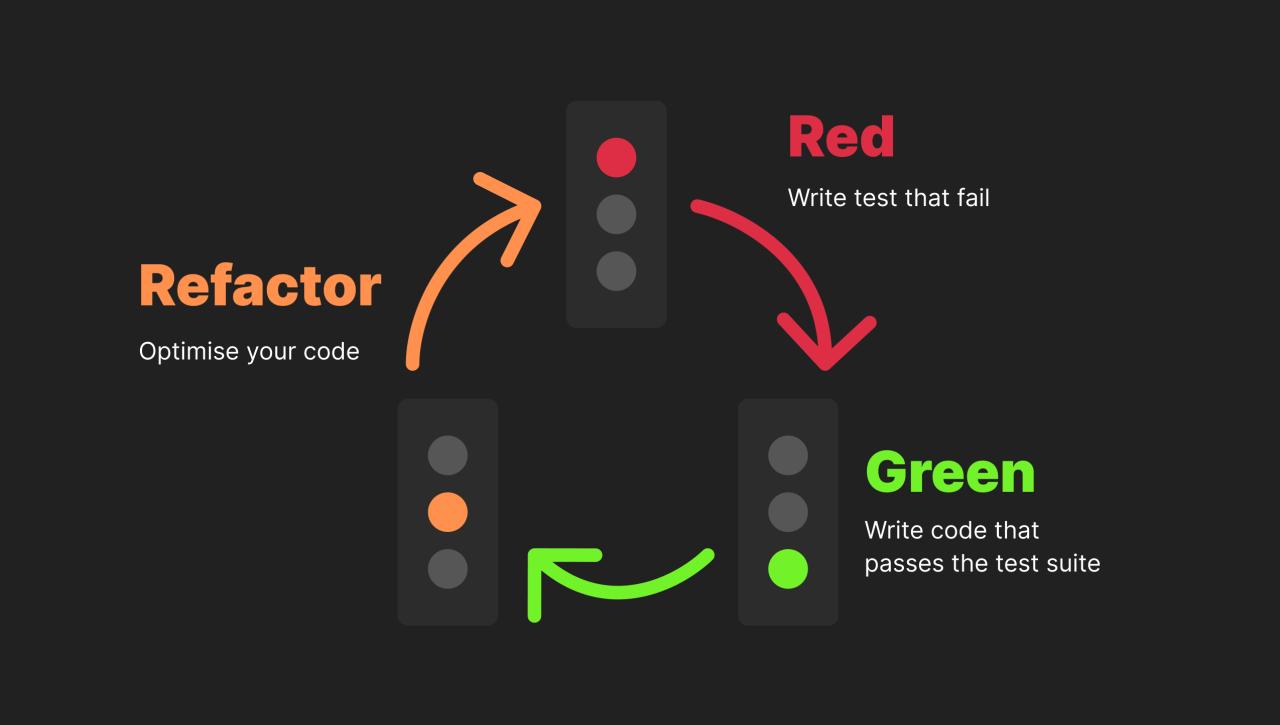
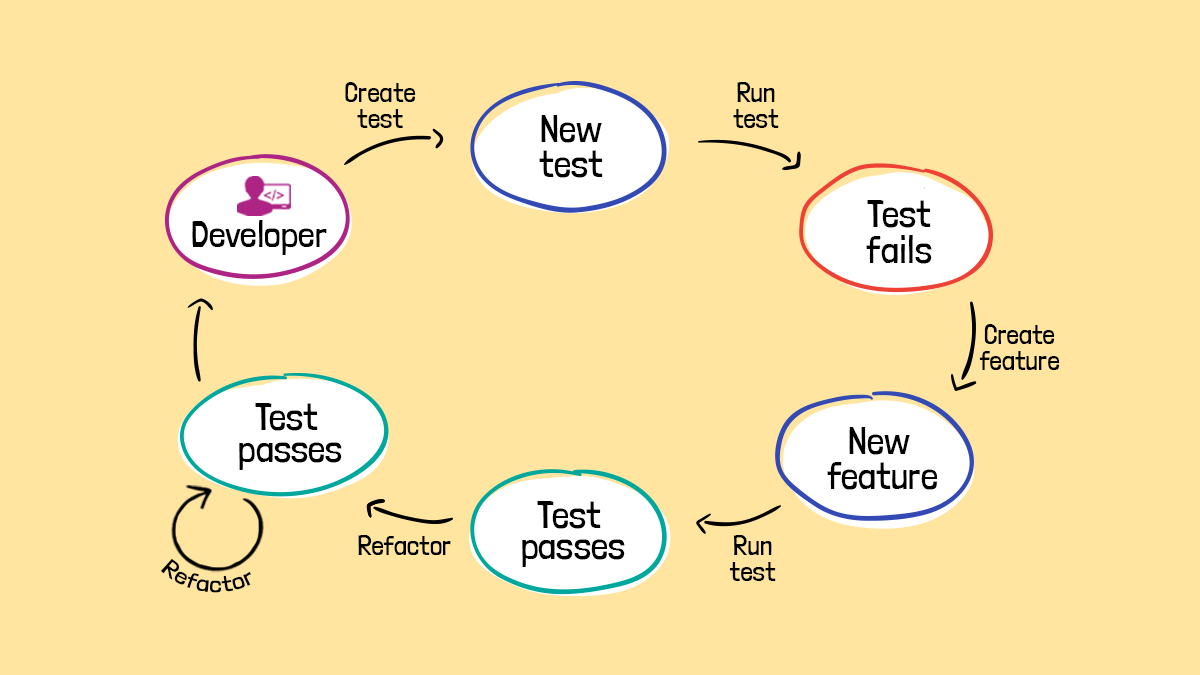
- Write Tests First (Test-Driven Development – TDD): Before making changes, write tests that verify the existing behavior of the code. This ensures that the refactoring doesn’t break existing functionality. TDD also aids in understanding the code’s purpose.
- Use Version Control: Employ a robust version control system (like Git) to track changes, allow for easy rollbacks, and facilitate collaboration. Commit changes frequently with descriptive messages.
- Automated Refactoring Tools: Utilize IDE features and automated refactoring tools to streamline common tasks such as renaming variables, extracting methods, and moving code.
- Documentation: Document the existing code, even if it’s a brief overview of key components and their interactions. This helps in understanding the codebase and makes it easier for others to contribute.
- Code Reviews: Conduct thorough code reviews to catch potential issues and ensure that refactoring efforts align with the project’s overall goals and coding standards.
- Refactoring Patterns: Apply established refactoring patterns to address common code smells and improve code structure. For instance, the “Extract Method” pattern can be used to break down long methods into smaller, more manageable units.
- Gradual Migration: For extremely complex systems, consider a gradual migration strategy. This involves incrementally replacing parts of the legacy system with new, refactored code, minimizing disruption.
Managing Time Constraints and Project Scope
Time and scope management are critical for successful refactoring projects. Careful planning and execution are essential to stay on track.
- Prioritize Refactoring Tasks: Identify the most critical areas for refactoring based on factors like code complexity, frequency of use, and potential for improvement. Focus on these areas first.
- Break Down Large Tasks: Divide large refactoring tasks into smaller, more manageable subtasks. This makes the project seem less daunting and allows for more frequent progress checks.
- Set Realistic Goals: Avoid over-committing to the refactoring effort. Set realistic goals and timelines based on the size and complexity of the codebase.
- Regular Progress Tracking: Track progress regularly to identify potential roadblocks and make necessary adjustments to the plan. Use tools like project management software or simple spreadsheets.
- Communication and Collaboration: Maintain open communication with stakeholders and other developers to ensure everyone is aware of the progress, challenges, and any necessary adjustments to the project scope.
- Incremental Releases: Deploy refactored code in small, incremental releases. This allows for early feedback and minimizes the impact of potential issues.
- Scope Creep Management: Be vigilant about scope creep. Refactoring projects can easily expand beyond their initial scope. Define the scope clearly at the beginning and stick to it.
- Timeboxing: Allocate specific time periods (timeboxes) for refactoring tasks. If a task is taking longer than expected, reassess the approach or adjust the scope.
Real-World Examples
Refactoring projects, when done effectively, can yield significant improvements in software quality, team productivity, and maintainability. Examining real-world case studies provides valuable insights into successful refactoring strategies and the tangible benefits they offer. Understanding these examples helps in making informed decisions about refactoring efforts and anticipating potential outcomes.
Successful Refactoring Projects and Lessons Learned
Several companies have documented their refactoring journeys, offering lessons that can be applied across various projects. These case studies demonstrate that refactoring isn’t just about rewriting code; it’s about understanding the business context and improving the long-term value of the software.
- E-commerce Platform: A large e-commerce platform faced performance issues and a growing codebase that was difficult to maintain. They refactored critical sections of their order processing and inventory management systems. The lessons learned included the importance of automated testing, the need for modular code, and the benefits of incremental refactoring. The result was a 30% improvement in order processing speed and a significant reduction in bug reports related to order discrepancies.
- Financial Services Application: A financial services firm refactored a legacy trading application to improve its performance and scalability. They adopted a microservices architecture, which allowed them to scale individual components independently. The lessons included the importance of choosing the right architecture, the need for strong communication between teams, and the challenges of managing distributed systems. The refactoring led to a 40% reduction in latency and improved the system’s ability to handle peak trading volumes.
- Social Media Application: A social media platform refactored its newsfeed algorithm to improve the relevance of content and user engagement. They used A/B testing to measure the impact of different refactoring approaches. The lessons learned highlighted the importance of data-driven decision-making and the need for continuous monitoring of performance. The refactoring resulted in a 15% increase in user engagement and a 10% increase in ad revenue.
Improvements in Team Collaboration and Code Readability
Refactoring often leads to improved team collaboration and enhanced code readability. Clearer, more concise code allows developers to understand the system more easily, making it easier to collaborate, onboard new team members, and reduce the time spent on debugging.
- Enhanced Communication: Refactoring forces teams to discuss the code, its purpose, and how it should function. This improves communication and shared understanding of the codebase.
- Simplified Code Review: Easier-to-read code streamlines the code review process. Reviewers can quickly grasp the code’s logic and identify potential issues.
- Reduced Cognitive Load: Well-refactored code reduces the mental effort required to understand and modify it. This boosts developer productivity and reduces the likelihood of errors.
- Improved Onboarding: Refactored code, with clear naming conventions and structure, makes it easier for new developers to understand the codebase. This accelerates onboarding and reduces the time needed to become productive.
Detailed Illustration of a Refactoring Project: Before and After
Consider a simplified example of a function designed to calculate the total cost of items in a shopping cart. This example illustrates how refactoring can improve code clarity and maintainability.
Before Refactoring (Example):
function calculateTotal(items, discount)
  let total = 0;
  for (let i = 0; i < items.length; i++)
    total += items[i].price
- items[i].quantity;

  if (discount > 0)
    total = total
- (1 - discount);

  return total;
After Refactoring (Example):
function calculateSubtotal(items)
  let subtotal = 0;
  for (const item of items)
    subtotal += item.price
- item.quantity;

  return subtotal;


function applyDiscount(subtotal, discount)
  return subtotal
- (1 - discount);


function calculateTotal(items, discount)
  const subtotal = calculateSubtotal(items);
  const total = applyDiscount(subtotal, discount);
  return total;
Description of Changes:
In the “before” example, the code is functional but lacks clarity. The refactored version separates the logic into smaller, more focused functions: calculateSubtotal calculates the subtotal, and applyDiscount applies the discount. The calculateTotal function now orchestrates the calls to these helper functions. This makes the code easier to read, understand, and maintain. If the discount calculation logic needs to change, only the applyDiscount function needs modification.
The use of descriptive function names also improves readability. This example illustrates a basic refactoring, demonstrating the impact of small, targeted changes on code quality.
Outcome Summary
In summary, refactoring your old projects is a journey of continuous improvement, allowing you to demonstrate your growth, enhance your skills, and create a compelling portfolio. By understanding the goals, planning strategically, and applying effective techniques, you can transform outdated code into a testament to your expertise. Embrace the challenges, celebrate the successes, and use refactoring as a catalyst for your professional advancement.
Remember, the evolution of your projects mirrors your own evolution as a developer. Let’s get started!