How to Prepare for Whiteboard Coding Challenges is more than just memorizing algorithms; it’s about mastering a unique skill set crucial for landing your dream tech job. These challenges test not only your coding abilities but also your problem-solving approach, communication skills, and ability to think on your feet. This guide will take you through the essential steps needed to conquer these often intimidating interviews.
We’ll explore the core components of whiteboard coding interviews, from understanding the interviewer’s perspective to dissecting the types of problems you’ll face. You’ll learn the vital technical skills, problem-solving techniques, and data structures knowledge required. Furthermore, we’ll cover how to effectively communicate your ideas, practice efficiently, and leverage mock interviews to refine your performance, ultimately equipping you with the tools needed to ace these challenges.
Understanding Whiteboard Coding Challenges
Whiteboard coding challenges are a unique part of the software engineering interview process. They serve as a way for interviewers to assess your problem-solving abilities, coding style, and communication skills in a relatively low-tech environment. The goal is to evaluate how you approach a problem, not just whether you can write perfect, bug-free code immediately. Think of it as a collaborative problem-solving session rather than a test of pure coding speed.
Core Purpose and Goals of Whiteboard Coding Interviews
The primary purpose of a whiteboard coding interview is to gauge your ability to think critically and systematically through a programming problem. The interviewer is looking for more than just correct code; they are observing your entire thought process.The key goals include:* Problem-solving ability: Can you break down a complex problem into smaller, manageable steps?
Algorithmic thinking
Do you understand and can you apply fundamental algorithms and data structures?
Coding proficiency
Can you write clean, readable, and efficient code (even if it’s not perfectly compilable)?
Communication skills
Can you clearly explain your thought process and the rationale behind your decisions?
Collaboration
Are you receptive to feedback and willing to adapt your approach based on the interviewer’s suggestions?Interviewers want to see how you handle pressure, how you react to challenges, and how well you communicate your ideas. They are assessing your potential to be a good team member and a competent software engineer.
Assessment Criteria in Whiteboard Challenges
Interviewers assess various aspects of your skills during a whiteboard coding challenge. This evaluation goes beyond simply checking if the code “works.”The main areas of assessment are:
- Problem Understanding: Demonstrating a clear understanding of the problem statement. This includes asking clarifying questions to ensure you grasp the requirements and constraints. For example, asking about edge cases like empty inputs or large data sets.
- Approach and Design: Choosing an appropriate approach and designing a suitable solution. This includes selecting the right data structures and algorithms to solve the problem efficiently. The interviewer looks for evidence that you have considered time and space complexity.
- Code Quality: Writing readable, maintainable, and understandable code. This involves using meaningful variable names, proper indentation, and commenting where necessary to explain complex logic. The goal is to write code that is easy for others (including the interviewer) to follow.
- Efficiency and Optimization: Considering the time and space complexity of your solution. This might involve suggesting improvements to optimize performance. For instance, recognizing that a linear search is inefficient for a large sorted dataset and suggesting a binary search instead.
- Testing and Validation: Describing how you would test your code to ensure it works correctly. This includes identifying potential test cases, such as boundary conditions, edge cases, and typical scenarios.
- Communication and Collaboration: Clearly explaining your thought process throughout the entire challenge. This involves articulating your ideas, reasoning, and assumptions, as well as being open to feedback and incorporating suggestions from the interviewer.
The interviewer is not just looking for a correct answer; they are also evaluating how you arrive at the solution.
Differences Between Whiteboard Challenges and Coding on a Computer
Whiteboard coding differs significantly from coding on a computer, and understanding these differences is crucial for preparation.Key differences include:
- Environment: You’re working on a whiteboard with a marker instead of a computer with an IDE, compiler, and debugger. This means you have limited space, no syntax highlighting, and no ability to run or test your code directly.
- Focus: The focus shifts from writing perfect, runnable code to demonstrating your thought process and problem-solving abilities. The emphasis is on the design and logic of your solution rather than the minutiae of syntax.
- Tools: You have no access to autocomplete, code completion, or online resources. You must rely on your knowledge and memory.
- Iteration: Iteration and revision are more challenging on a whiteboard. You may need to erase and rewrite sections of your code. This emphasizes the importance of planning and careful consideration before you start writing.
- Testing: You can’t run your code to test it. Instead, you must manually walk through your code with sample inputs and identify potential edge cases.
Because of these differences, whiteboard challenges require a different mindset and a different approach to coding. It’s about communicating your ideas effectively and demonstrating your understanding of the underlying principles.
Types of Problems Often Presented
Whiteboard coding challenges often involve problems related to data structures and algorithms. The specific types of problems can vary depending on the role and the company, but some common categories exist.Here’s a breakdown of the types of problems often presented, categorized by data structures and algorithms:
- Arrays: Array-based problems are common. Examples include finding the maximum subarray sum, rotating an array, or merging two sorted arrays.
- Linked Lists: Linked list problems test your understanding of pointers and dynamic data structures. Examples include reversing a linked list, detecting cycles in a linked list, or merging two sorted linked lists.
- Strings: String manipulation problems are frequently used. Examples include reversing a string, checking if a string is a palindrome, or finding the longest common prefix of a set of strings.
- Trees: Tree-based problems assess your knowledge of tree traversal, search, and manipulation. Examples include traversing a binary tree (inorder, preorder, postorder), finding the depth of a tree, or checking if a tree is balanced.
- Hash Tables/Hash Maps: Hash table problems test your understanding of hash functions and efficient data retrieval. Examples include implementing a hash table, checking for duplicates in an array, or finding the most frequent element in a list.
- Graphs: Graph problems test your ability to model relationships between data points. Examples include finding the shortest path between two nodes (e.g., using Dijkstra’s algorithm), detecting cycles in a graph, or performing a topological sort.
- Sorting Algorithms: You might be asked to implement or explain sorting algorithms, such as bubble sort, merge sort, or quicksort.
- Searching Algorithms: Problems related to searching, such as binary search, are also common.
- Dynamic Programming: Dynamic programming problems involve breaking down a complex problem into simpler subproblems and storing the results to avoid redundant calculations. Examples include the knapsack problem or the Fibonacci sequence.
The difficulty level of these problems can vary, but the goal is to assess your understanding of fundamental concepts and your ability to apply them to solve real-world problems. The problems often require a combination of data structures and algorithms to be solved efficiently.
Essential Technical Skills
Mastering essential technical skills is crucial for success in whiteboard coding challenges. These skills form the foundation upon which you’ll build solutions, allowing you to efficiently and effectively communicate your problem-solving approach. This section will delve into the core programming concepts, complexity analysis, and the importance of selecting the right data structures and algorithms.
Fundamental Programming Concepts
Understanding fundamental programming concepts is paramount for tackling whiteboard challenges. These concepts serve as the building blocks for all your solutions.
- Data Types: Understanding primitive data types (integers, floats, booleans, characters) and their limitations is fundamental. Also, know how to work with more complex data types, like strings and arrays.
- Control Flow: Proficiency in control flow statements (if/else statements, loops – for, while) is essential for directing the program’s execution. You need to be able to write conditional logic and iterative processes with ease.
- Functions/Methods: Being able to define and call functions/methods is crucial for code organization, reusability, and modularity. Understand the concepts of parameters, return values, and scope.
- Object-Oriented Programming (OOP) Principles (if applicable): If you’re using a language that supports OOP, understand concepts like classes, objects, inheritance, polymorphism, and encapsulation. These are essential for modeling real-world problems.
- Recursion: Knowing how to solve problems recursively can be helpful for specific types of problems, such as tree traversals or problems that can be broken down into smaller, self-similar subproblems. Understand the base case and the recursive step.
Time and Space Complexity Analysis
Analyzing time and space complexity is a core skill for evaluating the efficiency of your code. This helps you understand how the performance of your solution scales with the input size.
Time complexity measures how the execution time of an algorithm grows as the input size increases. Space complexity measures how the amount of memory used by an algorithm grows with the input size.
Big O notation is used to express the upper bound of an algorithm’s growth rate, providing a simplified way to compare the efficiency of different algorithms. It describes the worst-case scenario.
Here are some common Big O complexities:
- O(1)
-Constant Time: The algorithm takes the same amount of time regardless of the input size. Example: Accessing an element in an array by its index. - O(log n)
-Logarithmic Time: The time increases logarithmically as the input size grows. Example: Binary search in a sorted array. The algorithm effectively halves the search space with each step. - O(n)
-Linear Time: The time increases linearly with the input size. Example: Iterating through all elements in an array once. - O(n log n)
-Linearithmic Time: Common in efficient sorting algorithms. Example: Merge sort and quicksort. - O(n2)
-Quadratic Time: The time increases proportionally to the square of the input size. Example: Nested loops iterating through all pairs of elements in an array. - O(2n)
-Exponential Time: The time doubles with each addition to the input size. Example: Algorithms that explore all subsets of a set (e.g., brute-force approaches to the Traveling Salesperson Problem). - O(n!)
-Factorial Time: The time grows very rapidly. Example: Algorithms that try all possible permutations of a set.
Important Note: Big O notation focuses on the dominant term in the complexity function. For example, if an algorithm has a time complexity of
3n2 + 5n + 10, its Big O notation isO(n2)because then2term dominates as n becomes large.
Choosing the Right Data Structures and Algorithms
Selecting the appropriate data structures and algorithms is critical for developing efficient and effective solutions. The right choices can significantly impact the performance and readability of your code.
The choice depends on the specific problem, the constraints (e.g., time and space limits), and the operations you need to perform frequently.
Consider the following when choosing a data structure or algorithm:
- Operations: What operations will you be performing most often (e.g., searching, inserting, deleting, sorting)?
- Time Complexity: How does the time complexity of each operation scale with the input size?
- Space Complexity: How much memory does the data structure require?
- Constraints: Are there any limitations on time or space?
Here’s a table summarizing common data structures and their uses:
| Data Structure | Description | Common Operations | Use Cases |
|---|---|---|---|
| Arrays | A contiguous block of memory used to store elements of the same data type. | Accessing elements by index (O(1)), inserting/deleting (O(n) in general, O(1) at the end). | Storing a list of items, implementing other data structures (e.g., stacks, queues), representing matrices. |
| Linked Lists | A sequence of nodes, where each node contains a value and a pointer to the next node. | Insertion/deletion (O(1) if the position is known), searching (O(n)). | Implementing stacks and queues, representing dynamic lists where frequent insertions and deletions are required. |
| Hash Tables (Hash Maps/Dictionaries) | A data structure that stores key-value pairs, using a hash function to compute an index for each key. | Insertion, deletion, and lookup (average case O(1)). | Storing and retrieving data based on a key, implementing caches, frequency counting. |
| Trees (Binary Search Trees, Heaps) | Hierarchical data structures. Binary Search Trees have ordered nodes, Heaps maintain a specific order property (min-heap or max-heap). | Searching, insertion, deletion (O(log n) for balanced trees like BSTs, O(log n) for heap operations). | Representing hierarchical data, implementing priority queues, sorting (e.g., heapsort). |
Practicing Problem-Solving Techniques
Effectively practicing problem-solving techniques is crucial for excelling in whiteboard coding challenges. This section provides a structured approach to tackle these challenges, emphasizing the importance of clarity and providing practical examples. Mastering these techniques will significantly improve your ability to translate problem statements into efficient and correct code.
Structured Approach to Solving Whiteboard Coding Problems
A systematic approach can dramatically improve your problem-solving efficiency and accuracy. Following a well-defined process helps you avoid common pitfalls and ensures you address all aspects of the problem.
- Understand the Problem: Carefully read and analyze the problem statement. Identify the inputs, outputs, and any constraints. This is the most important step, as a misunderstanding can lead to an incorrect solution.
- Clarify Requirements: Ask clarifying questions to eliminate ambiguity. Ensure you fully understand the problem’s scope and edge cases.
- Design a Solution: Develop a high-level strategy to solve the problem. Consider different approaches, such as brute force, divide and conquer, or dynamic programming, and choose the most appropriate one based on efficiency requirements.
- Pseudocode: Write pseudocode to Artikel the steps of your solution. This helps you structure your thoughts and identify potential logic errors before you start coding.
- Code the Solution: Translate the pseudocode into actual code. Pay close attention to syntax, variable names, and code readability.
- Test the Solution: Test your code with various test cases, including edge cases, to ensure it produces the correct output.
- Optimize (if necessary): If your solution meets the requirements, analyze its time and space complexity. Consider optimizing the code if needed, such as by reducing redundant computations or using more efficient data structures.
- Explain Your Solution: Briefly explain your approach and reasoning to the interviewer. This demonstrates your understanding and problem-solving skills.
Clarifying Requirements and Asking Clarifying Questions
Asking clarifying questions is a critical step in the problem-solving process. It ensures you fully understand the problem and avoid making incorrect assumptions.
- Inputs and Outputs: Inquire about the format and types of the input and output. For example, “Are the inputs integers, strings, or other data types? What is the expected format of the output?”
- Constraints: Identify any limitations on the input size or the allowed time/space complexity. For example, “What is the maximum size of the input array? What are the time and space complexity requirements?”
- Edge Cases: Explore potential edge cases that might cause your solution to fail. For example, “What happens if the input is empty? What if the input contains duplicate values?”
- Ambiguities: Address any uncertainties in the problem statement. For example, “What should I do if there are multiple solutions? How should I handle invalid input?”
- Assumptions: Clarify any assumptions you are making. For example, “Can I assume the input is always valid? Can I use built-in functions?”
Examples of Common Algorithmic Problems and How to Approach Them
Familiarity with common algorithmic problems and their associated approaches is essential for success in whiteboard coding challenges. Here are examples of frequently encountered problems and how to tackle them.
Sorting
Sorting algorithms arrange a collection of items in a specific order, such as numerical or alphabetical. The choice of algorithm depends on the size of the data and the desired efficiency.
- Problem: Sort an array of integers in ascending order.
- Approach:
- Choose an Algorithm: For smaller datasets, you might choose a simple algorithm like bubble sort or insertion sort. For larger datasets, consider more efficient algorithms like merge sort or quicksort.
- Pseudocode (Quicksort Example):
function quicksort(array, low, high):
if low < high:
pivotIndex = partition(array, low, high)
quicksort(array, low, pivotIndex – 1)
quicksort(array, pivotIndex + 1, high)
Searching
Searching algorithms locate a specific element within a data structure. The efficiency of the search depends on the data structure and the search algorithm used.
- Problem: Find the index of a target value in a sorted array.
- Approach:
- Choose an Algorithm: Binary search is the most efficient approach for sorted arrays.
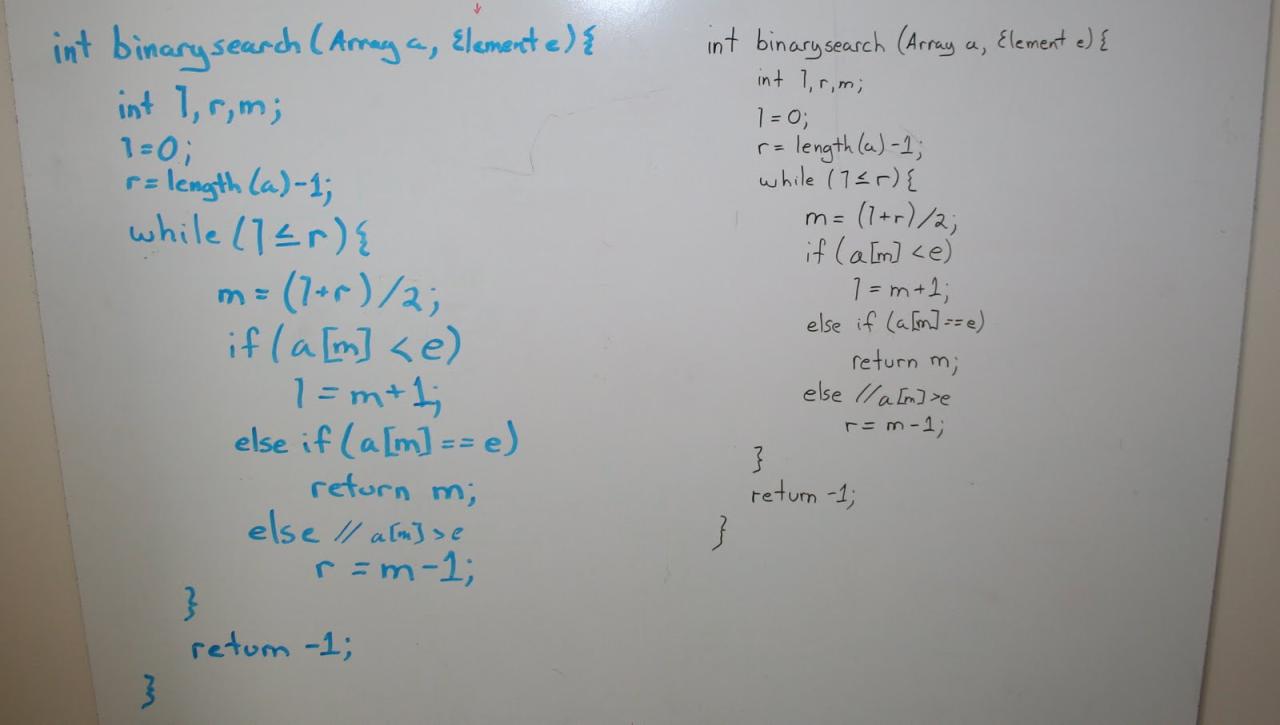
- Pseudocode (Binary Search Example):
function binarySearch(array, target):
low = 0
high = array.length – 1
while low <= high:
mid = (low + high) / 2
if array[mid] == target:
return mid
else if array[mid] < target:
low = mid + 1
else:
high = mid – 1
return -1
Graph Traversal
Graph traversal algorithms explore the nodes and edges of a graph. Breadth-first search (BFS) and depth-first search (DFS) are two fundamental graph traversal techniques.
- Problem: Determine if a path exists between two nodes in a graph.
- Approach:
- Choose an Algorithm: Both BFS and DFS can be used to solve this problem. BFS is often preferred for finding the shortest path, while DFS is simpler to implement for general path existence.
- Pseudocode (DFS Example):
function dfs(graph, startNode, endNode, visited):
if startNode == endNode:
return true
visited.add(startNode)
for each neighbor in graph.getNeighbors(startNode):
if neighbor not in visited:
if dfs(graph, neighbor, endNode, visited):
return true
return false
Demonstrating the Use of Pseudocode
Pseudocode is a crucial tool for outlining your solution before you begin coding. It allows you to structure your thoughts, identify potential errors, and communicate your approach effectively.
- Benefits of Pseudocode:
- Clarity: It helps you clearly articulate your solution.
- Error Detection: It allows you to identify logical errors before writing actual code.
- Communication: It facilitates communication with the interviewer.
- Efficiency: It saves time by allowing you to plan your code before writing it.
- Example: Implementing a function to reverse a string.
- Problem: Reverse a given string.
- Pseudocode:
function reverseString(str):
create an empty string called reversedStr
for each character in str (from right to left):
append character to reversedStr
return reversedStr
Data Structures Mastery
Data structures are fundamental building blocks in computer science and software engineering. Mastering them is crucial for success in whiteboard coding challenges. Understanding how to use data structures effectively allows you to design efficient algorithms, optimize code performance, and solve complex problems with elegance. This section will delve into essential data structures, their characteristics, and how to choose the right one for the task at hand.
Essential Data Structures
Understanding the core data structures is a must for any aspiring software engineer. This section covers the essential data structures that frequently appear in whiteboard coding challenges.
- Arrays: Arrays store a fixed-size, sequential collection of elements of the same data type. They provide fast access to elements using an index but can be less efficient for insertions and deletions, especially in the middle of the array.
- Linked Lists: Linked lists are linear data structures where elements are linked using pointers. They offer flexibility in terms of insertion and deletion but can have slower access times compared to arrays. There are different types, including singly linked lists, doubly linked lists, and circular linked lists.
- Trees: Trees are hierarchical data structures consisting of nodes connected by edges. They are used to represent relationships and organize data in a non-linear way. Common types include binary trees, binary search trees (BSTs), and balanced trees (e.g., AVL trees, red-black trees).
- Graphs: Graphs are collections of nodes (vertices) and edges that connect them. They are used to model relationships between objects. Graphs can be directed or undirected, and weighted or unweighted.
- Hash Tables (Hash Maps): Hash tables store key-value pairs, allowing for efficient retrieval of values based on their keys. They use a hash function to map keys to indices in an array.
- Stacks: Stacks are linear data structures that follow the Last-In, First-Out (LIFO) principle. They are used for tasks like function call management and expression evaluation.
- Queues: Queues are linear data structures that follow the First-In, First-Out (FIFO) principle. They are used for tasks like managing print jobs or handling requests in a server.
Choosing the Appropriate Data Structure
Selecting the right data structure depends on the specific problem requirements. Consider factors like the operations you’ll need to perform (search, insert, delete), the frequency of those operations, and the size of the data.
- Arrays: Use when you need fast access to elements by index and the size of the data is known in advance.
- Linked Lists: Use when you need frequent insertions and deletions, especially in the middle of the data, and when the size of the data is dynamic.
- Trees: Use when you need to represent hierarchical relationships or perform efficient searching, sorting, and retrieval of data. Binary Search Trees are good for sorted data, while balanced trees provide guaranteed performance.
- Graphs: Use when you need to model relationships between objects, such as networks, social connections, or dependencies.
- Hash Tables: Use when you need fast lookups based on keys.
- Stacks: Use when you need to manage function calls, reverse a sequence, or implement undo/redo functionality.
- Queues: Use when you need to manage tasks in a specific order, such as processing requests or simulating real-world processes.
Advantages and Disadvantages of Different Data Structures
Understanding the trade-offs between different data structures is critical for making informed decisions during coding challenges. The following table summarizes the advantages and disadvantages of the data structures discussed.
| Data Structure | Advantages | Disadvantages |
|---|---|---|
| Arrays | Fast access (O(1)), Simple to implement, Contiguous memory allocation | Fixed size, Inefficient insertions/deletions (O(n)), Can waste memory if not fully utilized |
| Linked Lists | Dynamic size, Efficient insertions/deletions (O(1) at head/tail), Flexible memory allocation | Slower access (O(n)), Requires extra memory for pointers, Can be difficult to traverse in reverse (singly linked lists) |
| Trees (BSTs) | Efficient searching, sorting, and retrieval (O(log n) on average), Hierarchical structure | Performance depends on tree balance, Inefficient for unstructured data, More complex to implement |
| Graphs | Models complex relationships, Flexible structure, Can represent various real-world scenarios | Can be complex to implement, Memory intensive for dense graphs, Performance depends on graph size and structure |
| Hash Tables | Fast lookups (O(1) on average), Efficient for key-value storage | Requires a good hash function to avoid collisions, Can be memory-intensive, Performance degrades with collisions |
| Stacks | Simple to implement, Useful for LIFO operations | Limited functionality, Not suitable for random access |
| Queues | Simple to implement, Useful for FIFO operations | Limited functionality, Not suitable for random access |
Example Problem and Solution
Here’s an example problem and solution that demonstrates the use of a specific data structure.
Problem: Given a string containing just the characters ‘(‘, ‘)’, ”, ”, ‘[‘ and ‘]’, determine if the input string is valid. An input string is valid if:
- Open brackets must be closed by the same type of brackets.
- Open brackets must be closed in the correct order.
- Every close bracket has a corresponding open bracket of the same type.
Solution: Use a stack to solve this problem. Iterate through the string. If you encounter an opening bracket, push it onto the stack. If you encounter a closing bracket, check if the stack is empty or if the top of the stack does not match the closing bracket. If either condition is true, the string is invalid.
Otherwise, pop the top element from the stack. After iterating through the entire string, if the stack is empty, the string is valid; otherwise, it is invalid.
Example Implementation (Python):def is_valid(s): stack = [] mapping = ")": "(", "": "", "]": "[" for char in s: if char in mapping: top_element = stack.pop() if stack else '#' if mapping[char] != top_element: return False else: stack.append(char) return not stack
Algorithm Proficiency
Whiteboard coding challenges heavily assess your understanding and application of algorithms.
Proficiency in algorithms demonstrates your ability to solve problems efficiently and choose the best approach for a given scenario. This section focuses on the most commonly tested algorithms and their practical applications.
Common Algorithms Tested
Whiteboard coding challenges often test your knowledge of several core algorithms. Knowing these algorithms and their variations is crucial for success.
- Sorting Algorithms: These algorithms arrange data in a specific order (ascending or descending). Examples include bubble sort, merge sort, and quicksort.
- Searching Algorithms: These algorithms locate a specific element within a dataset. Binary search is a common example.
- Graph Traversal Algorithms: Used to explore and process nodes in a graph structure. Breadth-first search (BFS) and depth-first search (DFS) are primary examples.
- Dynamic Programming: This technique solves complex problems by breaking them down into smaller, overlapping subproblems.
- Greedy Algorithms: These algorithms make locally optimal choices at each step with the hope of finding a global optimum.
Sorting Algorithms and Performance Characteristics
Sorting algorithms are fundamental tools for organizing data. Different algorithms have varying performance characteristics based on factors like time complexity (how the algorithm’s runtime grows with input size) and space complexity (the amount of memory the algorithm uses).
- Bubble Sort: This is one of the simplest sorting algorithms. It repeatedly steps through the list, compares adjacent elements, and swaps them if they are in the wrong order. Bubble sort has a time complexity of O(n 2) in the worst and average cases, making it inefficient for large datasets. Its space complexity is O(1) (in-place).
- Merge Sort: This is a divide-and-conquer algorithm. It divides the input list into smaller sublists, sorts the sublists, and then merges them back together in a sorted manner. Merge sort has a time complexity of O(n log n) in all cases, making it more efficient than bubble sort for larger datasets. Its space complexity is O(n) because it requires extra space for merging.
- Quicksort: Another divide-and-conquer algorithm. It selects a “pivot” element and partitions the other elements into two sub-arrays, according to whether they are less than or greater than the pivot. The sub-arrays are then recursively sorted. Quicksort has an average time complexity of O(n log n), but a worst-case time complexity of O(n 2). Its space complexity is O(log n) on average due to the recursive calls.
Consider a scenario where you need to sort a list of student scores. If the list is relatively small, bubble sort might be acceptable due to its simplicity. However, for a large dataset of student scores (e.g., thousands or millions), merge sort or quicksort would be preferred for their better time complexity.
Breadth-First Search (BFS) Implementation Procedure
Breadth-first search (BFS) is a graph traversal algorithm that explores a graph level by level. It starts at a source node and visits all its neighbors before moving on to the next level of neighbors.
Here’s a step-by-step procedure for implementing BFS:
- Initialization: Create a queue and a set (or a dictionary/hashmap) to keep track of visited nodes. Add the starting node to the queue and mark it as visited.
- Iteration: While the queue is not empty:
- Dequeue a node from the queue.
- Process the node (e.g., print its value or perform some operation).
- For each unvisited neighbor of the current node:
- Mark the neighbor as visited.
- Enqueue the neighbor.
Example: Consider a graph represented by an adjacency list:
"A": ["B", "C"],
"B": ["D", "E"],
"C": ["F"],
"D": [],
"E": ["F"],
"F": []
Starting from node “A”, BFS would visit the nodes in the following order: A, B, C, D, E, F.
BFS vs. DFS: Comparative Examples
Breadth-first search (BFS) and depth-first search (DFS) are both fundamental graph traversal algorithms, but they explore graphs in different ways, leading to different applications.
- Traversal Order:
- BFS: Explores nodes level by level. It visits all neighbors of a node before moving to the next level.
- DFS: Explores as far as possible along each branch before backtracking. It goes deep into the graph before exploring other paths.
- Use Cases:
- BFS: Often used to find the shortest path in an unweighted graph, or to find the minimum number of steps to reach a target. It’s suitable for problems where you need to explore all possible paths at the same level before going deeper.
- DFS: Can be used to detect cycles in a graph, find connected components, or solve maze problems. It’s often used when you need to explore all possible paths from a starting node.
Example: Finding the shortest path in a maze: Imagine a maze represented as a graph where each cell is a node, and edges connect adjacent cells. BFS is an ideal choice for finding the shortest path from the starting cell to the exit cell because it systematically explores the maze layer by layer.
Example: Finding cycles in a graph: DFS is commonly used to detect cycles. During the traversal, if a node is visited again along the current path, it indicates a cycle.
Communication and Code Clarity
Effective communication and clear code are crucial for success in whiteboard coding challenges. Interviewers are not just assessing your technical skills but also your ability to articulate your thought process and write code that is easy to understand. This section provides strategies to improve your communication and code clarity, helping you shine in your coding interviews.
Tips for Effective Communication During a Whiteboard Coding Interview
Being able to communicate effectively is just as important as writing correct code. Interviewers want to see how you think and how you approach problems. Here are some tips to help you communicate effectively:
- Before You Start: Always clarify the problem statement. Ask clarifying questions to ensure you fully understand the requirements, constraints, and expected output. Don’t be afraid to ask for examples or edge cases. For instance, if asked to reverse a string, clarify if you should handle spaces, punctuation, or special characters.
- Explain Your Approach: Before writing any code, explain your overall strategy. Break down the problem into smaller, manageable steps. Describe the algorithms and data structures you plan to use and why you chose them. For example, “I’ll use a hash map to store the frequency of each character in the string, then iterate through the hash map to find the most frequent character.”
- Think Out Loud: Verbalize your thought process as you code. Explain why you’re making specific choices, what you’re considering, and any potential issues you’re addressing. This allows the interviewer to follow your logic and provide guidance if needed. For example, “I’m choosing to use a ‘for’ loop here because I need to iterate through each element of the array.”
- Comment Your Code (as you go): As you write code, add comments to explain what each section does. This makes your code easier to understand and demonstrates good coding practices. Comments should explain the ‘why’ and the ‘what’, not just the ‘how’.
- Test Your Code: After writing your code, walk through it with example inputs to ensure it works correctly. Explain your test cases and the expected output. This demonstrates that you understand the problem and can verify your solution. If you encounter errors, explain your debugging process.
- Listen Actively: Pay close attention to the interviewer’s feedback and suggestions. Incorporate their input and be open to alternative solutions. Ask clarifying questions if you don’t understand something.
- Be Confident, But Humble: Present your ideas confidently, but be open to suggestions and feedback. Acknowledge areas where you’re unsure and be willing to learn.
The Importance of Commenting Code and Explaining Your Thought Process
Commenting code and explaining your thought process are essential for readability and maintainability. They demonstrate your understanding of the problem and your ability to communicate your ideas effectively.
- Readability: Comments make your code easier to understand for others (including the interviewer) and for yourself later on.
- Maintainability: Well-commented code is easier to modify and debug.
- Demonstrates Understanding: Explaining your thought process shows that you understand the problem and the solution.
- Facilitates Feedback: Comments and explanations allow the interviewer to understand your approach and provide constructive feedback.
Examples of Well-Written Code with Clear Variable Names and Consistent Formatting
Well-written code is easy to read, understand, and maintain. Using clear variable names, consistent formatting, and comments are essential for code clarity.
Example 1: Reversing a String
Poorly written code:
function revStr(s)
  let r = "";
  for (let i = s.length - 1; i >= 0; i--)
    r += s[i];

  return r;
Well-written code:
function reverseString(inputString)
  // Initialize an empty string to store the reversed string.
  let reversedString = "";

  // Iterate through the input string from the last character to the first.
  for (let i = inputString.length - 1; i >= 0; i--)
    // Append the current character to the reversed string.
    reversedString += inputString[i];


  // Return the reversed string.
 return reversedString;
Example 2: Finding the Maximum Value in an Array
Poorly written code:
function findMax(arr)
  let m = arr[0];
  for(let i = 1; i  < arr.length; i++)
    if(arr[i] > m)
      m = arr[i];


  return m;
Well-written code:
function findMaximumValue(numbers)
  // Assume the first element is the maximum initially.
  let maximumValue = numbers[0];

  // Iterate through the array, starting from the second element.
  for (let i = 1; i  < numbers.length; i++)
    // If the current element is greater than the current maximum, update the maximum.
    if (numbers[i] > maximumValue)
      maximumValue = numbers[i];


  // Return the maximum value found in the array.
 return maximumValue;
A Guide on How to Handle Errors and Edge Cases Gracefully
Handling errors and edge cases demonstrates your ability to write robust and reliable code. Anticipating and addressing these situations is crucial for producing code that functions correctly under all circumstances.
- Identify Edge Cases: Before writing any code, consider potential edge cases. For example, when reversing a string, what happens if the string is empty or contains special characters? For array problems, what happens if the array is empty or contains duplicate values?
- Input Validation: Validate the input to ensure it meets the expected criteria. For example, check if a function receives the correct data type or if an array is within a specified size range.
- Error Handling: Implement error handling mechanisms to gracefully manage unexpected situations. This might involve returning specific error codes, throwing exceptions, or logging errors for debugging.
- Testing: Test your code with a variety of inputs, including edge cases, to ensure it behaves as expected. This helps identify and fix potential issues.
- Examples of Edge Cases and Error Handling:
- String Reversal:
- Edge Case: Empty string.
- Handling: Return an empty string.
- Code:
function reverseString(str)
  if (str.length === 0)
    return ""; // Handle empty string

  let reversed = "";
  for (let i = str.length - 1; i >= 0; i--)
    reversed += str[i];

  return reversed;
- Edge Case: Empty array.
- Handling: Return an appropriate value (e.g., -Infinity or throw an error).
- Code:
function findMax(arr)
  if (arr.length === 0)
    return -Infinity; // Handle empty array

  let max = arr[0];
  for (let i = 1; i  < arr.length; i++)
    if (arr[i] > max)
      max = arr[i];


  return max;
Practice and Resources

To truly excel at whiteboard coding challenges, consistent practice and access to the right resources are essential. This section provides guidance on where to practice, how to approach different problem types, and how to refine your skills through effective review. Mastering these aspects will significantly boost your confidence and performance in technical interviews.
Online Platforms and Resources for Practice
A variety of online platforms offer coding challenges and practice environments. Leveraging these resources is key to familiarizing yourself with different problem formats and honing your problem-solving abilities.
- LeetCode: This platform is a cornerstone for coding interview preparation. It offers a vast library of problems categorized by difficulty, topic, and company. You can submit your code, test it against various test cases, and view discussions and solutions from other users. The platform is widely used by tech companies for evaluating candidates.
- HackerRank: HackerRank provides a comprehensive platform for coding challenges, including algorithm, data structure, and database problems. It also hosts contests and allows you to track your progress and compare your performance with other users. Many companies use HackerRank for their technical screening process.
- Coderbyte: Coderbyte focuses on bite-sized coding challenges and interview preparation. It offers a range of challenges with built-in coding environments and a focus on specific skill sets, making it ideal for targeted practice. The platform is particularly useful for practicing specific coding concepts.
- GeeksforGeeks: GeeksforGeeks provides a wealth of information on algorithms, data structures, and coding interview questions. It offers a vast collection of articles, tutorials, and practice problems, making it a valuable resource for both beginners and experienced programmers. The platform is particularly helpful for understanding the theoretical foundations of computer science.
- InterviewBit: InterviewBit offers a curated set of coding problems specifically designed to prepare candidates for technical interviews. It focuses on a structured approach to learning, guiding users through various topics and providing personalized recommendations.
Coding Problems Categorized by Difficulty Level
Coding problems are often categorized by difficulty to allow for a gradual progression in skill development. Understanding the typical difficulty levels helps you select appropriate problems for practice.
- Easy: These problems typically involve straightforward implementations of basic algorithms and data structures. They often test your understanding of fundamental concepts like loops, conditional statements, and simple array manipulations. Examples include reversing a string, finding the maximum element in an array, or implementing a simple function.
- Medium: Medium-level problems require a deeper understanding of algorithms and data structures, often involving more complex logic and problem-solving techniques. They may require you to combine multiple concepts or apply more advanced techniques like dynamic programming or graph traversal. Examples include finding the shortest path in a graph, implementing a binary search tree, or solving a dynamic programming problem like the knapsack problem.
- Hard: Hard problems are designed to challenge your problem-solving skills and require a strong grasp of advanced algorithms and data structures. They often involve complex logic, optimization techniques, and the ability to handle edge cases. Examples include solving complex graph algorithms, implementing advanced data structures, or optimizing a complex algorithm for time and space efficiency.
Strategies for Practicing Under Time Constraints
Whiteboard coding challenges are often time-limited. Practicing under time constraints is crucial for developing the ability to solve problems efficiently.
- Simulate Interview Conditions: Practice in a setting that mirrors the actual interview. Use a whiteboard or large paper, set a timer, and solve problems without using an IDE or compiler. This helps you get accustomed to the pressure of the interview environment.
- Prioritize Problem Solving: Focus on understanding the problem, outlining your approach, and writing clean, concise code. Don’t get bogged down in minor details. Get a working solution, even if it’s not perfectly optimized.
- Time Management Techniques: Allocate time for each stage of the problem-solving process: understanding the problem, designing the solution, writing the code, and testing. Stick to your time allocations as closely as possible. For instance, you might allocate 5 minutes to understand the problem, 10 minutes to design the solution, 15 minutes to write the code, and 5 minutes to test and refine.
- Practice with a Timer: Regularly practice coding problems under time constraints. Start with longer time limits and gradually reduce them as you improve. This will help you build speed and efficiency.
- Focus on Communication: Practice verbalizing your thought process while coding. Explain your approach, justify your decisions, and clarify any assumptions. This is crucial for demonstrating your problem-solving skills to the interviewer.
The Process of Reviewing and Analyzing Your Solutions to Improve Performance
Effective review is essential for learning from your mistakes and improving your coding skills. This involves carefully examining your solutions and identifying areas for improvement.
- Review Your Code: After completing a coding challenge, carefully review your code. Look for any errors, inefficiencies, or areas where you could have written cleaner, more concise code.
- Analyze Your Approach: Evaluate your problem-solving strategy. Did you choose the most efficient algorithm or data structure? Could you have optimized your solution further? Did you consider all edge cases?
- Compare Your Solution to Others: Review solutions from other users on platforms like LeetCode or GeeksforGeeks. Compare your approach to theirs and identify areas where you could have improved. Learn from their techniques and coding style.
- Identify Patterns: Look for recurring patterns in your mistakes. Are you consistently struggling with a particular type of problem or algorithm? Identifying these patterns will help you focus your practice on those areas.
- Track Your Progress: Keep track of your practice sessions, the problems you solved, and the time it took you to solve them. This will help you monitor your progress and identify areas where you are improving. For example, create a spreadsheet or use a dedicated app to log your practice sessions. Include details such as the date, problem name, difficulty level, time taken, and any notes on your approach or mistakes.
- Seek Feedback: Ask experienced programmers or mentors to review your code and provide feedback. They can offer valuable insights and help you identify areas for improvement that you might have missed.
Mock Interviews and Feedback
Mock interviews are an invaluable tool for preparing for whiteboard coding challenges. They simulate the actual interview environment, allowing you to practice your problem-solving skills, communication, and code clarity under pressure. This practice is crucial for building confidence and identifying areas for improvement before the real interview.
The Value of Mock Interviews
Mock interviews provide a realistic simulation of the interview process, allowing you to refine your approach. Participating in mock interviews helps you to experience the pressure of time constraints and the need to think on your feet, which is essential for success in whiteboard coding challenges. They offer a safe space to make mistakes and learn from them.
Finding and Preparing for Mock Interviews
There are several avenues for finding and preparing for mock interviews. Utilize these resources to gain valuable experience.
- Online Platforms: Websites like Pramp, InterviewBit, and interviewing.io connect you with other candidates for mock interviews. These platforms often provide a structured environment and feedback.
- Career Services: Your university or college’s career services department may offer mock interview sessions, often conducted by experienced professionals or alumni.
- Networking: Reach out to friends, colleagues, or mentors who have experience with technical interviews. They can provide valuable insights and practice.
- Preparation: Before the mock interview, review common coding problems, data structures, and algorithms. Practice talking through your thought process and explaining your code clearly. Treat the mock interview as seriously as a real interview. Prepare questions to ask the interviewer at the end.
The Importance of Seeking and Incorporating Feedback
Feedback is a critical component of the learning process. Actively seeking and incorporating feedback from mock interviews is essential for improvement. It allows you to identify your weaknesses and refine your strengths.
- Ask for Specific Feedback: Don’t just ask “How did I do?”. Instead, ask specific questions like “Was my code easy to understand?” or “Did I effectively explain my thought process?”.
- Take Notes: During the interview, take notes on the interviewer’s feedback. After the interview, review your notes and identify areas for improvement.
- Practice the Feedback: Incorporate the feedback into your future practice sessions. If you struggled with code clarity, focus on improving your comments and variable names.
- Iterate and Improve: Use the feedback to iterate on your approach. Participate in multiple mock interviews and track your progress over time.
Common Feedback Points Interviewers Provide
Interviewers often focus on specific aspects of your performance. Understanding these common feedback points can help you focus your preparation.
- Problem Understanding: Did you fully understand the problem statement? Were you able to clarify any ambiguities?
- Algorithm Design: Was your chosen algorithm efficient and appropriate for the problem?
- Code Clarity: Was your code easy to read and understand? Did you use meaningful variable names and comments?
- Communication: Did you clearly explain your thought process and the logic behind your code?
- Problem-Solving Approach: Did you take a structured approach to solving the problem? Did you consider edge cases and potential optimizations?
- Testing: Did you thoroughly test your code with different inputs? Did you identify and address any potential bugs?
- Time Management: Did you manage your time effectively? Were you able to complete the problem within the allotted time?
Common Mistakes to Avoid
Whiteboard coding interviews can be daunting, and it’s easy to make mistakes under pressure. Understanding the common pitfalls and developing strategies to avoid them is crucial for success. This section focuses on identifying these errors and providing practical advice to help you perform your best.
Failing to Clarify Requirements
Before diving into code, it’s essential to fully understand the problem. Jumping in without asking clarifying questions can lead to incorrect assumptions and a solution that doesn’t meet the requirements.
- Not asking enough questions: Don’t be afraid to ask about edge cases, input types, and expected output formats. For instance, if the problem involves sorting, ask if the input is guaranteed to be integers, if duplicates are possible, or if the sorting should be in ascending or descending order.
- Making assumptions: Avoid making assumptions about the problem’s constraints or expected behavior. Always clarify these details with the interviewer.
- Not considering edge cases: Failing to address edge cases can result in incomplete or incorrect solutions. Consider scenarios such as empty inputs, null values, or extremely large numbers.
Poor Communication and Code Clarity
Communication is a vital part of the interview process. Even if your code is correct, failing to communicate your thought process or write clear code can negatively impact your evaluation.
- Not explaining your approach: Before writing code, explain your planned solution. Describe the algorithms and data structures you intend to use and why you chose them.
- Lack of comments: Use comments to explain the purpose of your code, especially complex logic or non-obvious steps. This makes your code easier to understand.
- Poor variable names: Choose descriptive variable names that clearly indicate the purpose of the variable. Avoid single-letter variable names unless they are used as loop counters (e.g., `i`, `j`, `k`).
- Inefficient code: While solving the problem, consider the time and space complexity of your solution. Discussing trade-offs is good.
Here’s an example of a code snippet with poor communication and clarity:
// What does this do?
function f(a, b)
  let c = [];
  for (let i = 0; i < a.length; i++)
    if (b.includes(a[i]))
      c.push(a[i]);


  return c;
The same code, improved for clarity and communication:
// Function to find common elements between two arrays
function findCommonElements(array1, array2)
  // Create an array to store common elements
  let commonElements = [];

  // Iterate through the first array
  for (let i = 0; i < array1.length; i++)
    // Check if the current element is present in the second array
    if (array2.includes(array1[i]))
      // If it is, add it to the commonElements array
      commonElements.push(array1[i]);


  // Return the array of common elements
  return commonElements;
Rushing into Coding Without a Plan
Jumping into code without a well-defined plan is a recipe for disaster. This can lead to wasted time, incorrect solutions, and a lack of understanding of the problem.
- Not designing before coding: Before writing any code, spend time designing your solution. Artikel the steps, algorithms, and data structures you will use.
- Ignoring test cases: Develop a set of test cases before you start coding. This will help you to test your solution and ensure it works correctly.
- Premature optimization: Don't focus on optimizing your code before it works correctly. First, write a working solution, and then optimize it if necessary.
Ignoring Time and Space Complexity
Analyzing the efficiency of your solution is a crucial aspect of the interview. Failing to consider time and space complexity can result in a less-than-optimal solution.
- Not discussing complexity: Always discuss the time and space complexity of your solution.
- Choosing inefficient algorithms: Choose algorithms and data structures that offer optimal time and space complexity.
- Not optimizing: If your initial solution has poor complexity, be prepared to discuss optimization strategies.
For example, consider a problem that asks to find the maximum element in an array. A naive solution might involve iterating through the array and comparing each element to the current maximum, resulting in O(n) time complexity and O(1) space complexity. While this is acceptable for this particular problem, failing to analyze it demonstrates a lack of awareness of complexity.
Getting Stuck and Giving Up
It's natural to get stuck during a coding interview. The key is to manage the situation effectively and avoid giving up.
- Not asking for help: If you are stuck, don't hesitate to ask the interviewer for help. They are there to guide you.
- Panicking: Try to stay calm and focused. Take a deep breath and revisit the problem.
- Giving up too easily: Even if you don't complete the solution perfectly, show your thought process and attempt to solve the problem.
Failing to Test Thoroughly
Testing your code is essential to ensure it functions correctly. Failing to test thoroughly can lead to errors and a solution that doesn't meet the requirements.
- Not creating test cases: Develop a comprehensive set of test cases to test your code.
- Not testing edge cases: Make sure your test cases cover edge cases, such as empty inputs, null values, and boundary conditions.
- Not debugging effectively: If your code doesn't work, be prepared to debug it. Use print statements or a debugger to identify and fix errors.
Not Practicing Enough
Practice is key to success in whiteboard coding interviews. Insufficient practice can lead to poor performance and a lack of confidence.
- Not solving enough problems: Solve a variety of coding problems to build your skills and familiarity with different algorithms and data structures.
- Not simulating the interview environment: Practice solving problems under time pressure, as you would in an interview.
- Not seeking feedback: Ask for feedback on your solutions from friends, mentors, or online communities.
Poor Stress Management
Interviews can be stressful, and stress can negatively impact your performance. Managing stress is critical for success.
- Not preparing: Adequate preparation reduces stress. The more you practice, the more confident you will feel.
- Not taking breaks: If you feel overwhelmed, take a short break to clear your head.
- Not being positive: Maintain a positive attitude throughout the interview. Believe in yourself and your abilities.
Post-Interview Analysis
Reflecting on your performance after a whiteboard coding challenge is a crucial step in your preparation journey. It allows you to identify areas of strength and weakness, refine your approach, and ultimately improve your coding skills. This process is not just about assessing what went wrong; it's about understandingwhy* it went wrong and developing strategies to prevent similar issues in the future.
It also includes leveraging feedback to your advantage and staying motivated throughout the process.
Reflecting on Your Performance
Analyzing your performance begins immediately after the interview. This is when the details are still fresh in your mind. Consider these steps:
- Recall the Problem: Try to reconstruct the problem statement as accurately as possible. Write down the prompt, including any clarifying questions the interviewer asked and your initial understanding of the requirements.
- Review Your Code: If possible, obtain a copy of your code or recreate it from memory. Examine your solution step-by-step. What were the key data structures and algorithms you used? Did your code compile and run correctly?
- Identify Strengths: What aspects of your performance went well? Did you correctly identify the problem type? Were you able to articulate your thought process clearly? Did you write clean, readable code? Acknowledging your successes is important for building confidence.
- Pinpoint Weaknesses: What areas need improvement? Did you struggle with the algorithm design? Did you make any syntax errors? Was your communication unclear? Did you run out of time?
Be honest with yourself and identify specific areas where you can improve.
- Analyze Your Approach: How did you approach the problem? Did you ask clarifying questions? Did you consider edge cases? Did you explain your thought process to the interviewer? Were there any alternative approaches you could have taken?
- Document Your Findings: Keep a journal or spreadsheet to record your reflections. This allows you to track your progress over time and identify recurring patterns. Note the date, the problem, your strengths, your weaknesses, and any insights you gained.
Using Feedback to Improve Future Performance
Feedback from interviewers is invaluable. It provides a different perspective on your performance and highlights areas you may have overlooked. Here's how to effectively use feedback:
- Request Feedback: If the interviewer doesn't offer feedback, don't hesitate to ask. You can politely inquire about areas where you could improve. Phrases like, "Could you provide any feedback on my performance?" or "Are there any areas you think I could focus on improving?" are appropriate.
- Listen Actively: When receiving feedback, listen attentively and take notes. Avoid interrupting the interviewer. Ask clarifying questions to ensure you understand their comments.
- Categorize Feedback: Organize the feedback into categories. For example, you might categorize feedback related to algorithm design, code clarity, or communication skills.
- Prioritize Areas for Improvement: Not all feedback is created equal. Focus on the areas that will have the biggest impact on your overall performance. Prioritize areas where you received consistent criticism.
- Translate Feedback into Actionable Steps: Don't just passively accept feedback. Develop a plan to address the identified weaknesses. For example, if you received feedback that your code was not readable, you might commit to writing more comments and using more descriptive variable names.
- Track Your Progress: Regularly review your feedback and monitor your progress. Are you seeing improvements in the areas where you've focused your efforts? Adjust your plan as needed.
Staying Motivated and Persistent
The preparation process can be challenging, and setbacks are inevitable. Maintaining motivation is crucial for long-term success. Consider these strategies:
- Set Realistic Goals: Break down your overall goal (e.g., getting a job) into smaller, more manageable steps. This makes the process feel less overwhelming and allows you to celebrate your progress along the way.
- Celebrate Small Wins: Acknowledge and reward yourself for achieving milestones, no matter how small. This could be as simple as taking a break, watching a movie, or treating yourself to something you enjoy.
- Focus on the Learning Process: Shift your focus from the outcome (getting a job) to the process of learning and improving. Embrace the challenge and view each interview as an opportunity to learn and grow.
- Seek Support: Connect with other aspiring software engineers, join online communities, or seek mentorship. Sharing your experiences and getting support from others can help you stay motivated and overcome challenges.
- Learn from Rejection: Rejection is a part of the process. Don't take it personally. Instead, view it as an opportunity to learn and grow. Analyze what went wrong and use that information to improve your approach.
- Practice Self-Care: Take care of your physical and mental health. Get enough sleep, eat a healthy diet, and exercise regularly. Make time for activities you enjoy and that help you relax and de-stress.
Creating a Personalized Improvement Plan
A personalized improvement plan is a roadmap for your preparation journey. It Artikels specific goals, strategies, and timelines for improving your coding skills.
- Define Your Goals: What are your short-term and long-term goals? What skills do you want to improve? Be specific and measurable. For example, "Improve my ability to solve graph problems" or "Increase my coding speed by 20%."
- Assess Your Current Skills: Identify your strengths and weaknesses. Use the post-interview analysis process and any other self-assessment tools.
- Identify Learning Resources: Determine the resources you'll use to improve your skills. This might include online courses, coding platforms, books, or practice problems.
- Create a Study Schedule: Allocate specific time slots for studying and practicing. Be realistic about how much time you can dedicate to your preparation. Consistency is key.
- Choose Practice Problems: Select practice problems that align with your goals and the areas you want to improve. Start with easier problems and gradually increase the difficulty.
- Practice Regularly: Consistent practice is essential for improving your coding skills. Aim to practice coding problems at least several times per week.
- Seek Feedback: Regularly seek feedback on your code from peers, mentors, or online communities. This helps you identify areas for improvement and refine your approach.
- Track Your Progress: Monitor your progress and make adjustments to your plan as needed. Celebrate your successes and learn from your setbacks.
- Review and Revise: Regularly review your improvement plan and revise it based on your progress and feedback. This ensures your plan remains relevant and effective.
For example, consider a candidate consistently struggling with binary tree problems. Their personalized improvement plan might include:
- Goal: Improve proficiency in binary tree data structures and algorithms.
- Assessment: Identified weakness in understanding tree traversal algorithms (inorder, preorder, postorder).
- Resources: Use online courses (e.g., freeCodeCamp's Data Structures and Algorithms course), and LeetCode for practice problems.
- Schedule: Dedicate 2 hours per week to study and practice binary tree problems.
- Practice Problems: Start with easy problems like "Invert Binary Tree" and gradually move to more complex problems.
- Feedback: Share code with a mentor for review and feedback.
- Progress Tracking: Track the number of problems solved and the time taken to solve them.
- Review: Review the plan monthly, adjust focus based on performance and feedback.
Closing Notes
In summary, conquering whiteboard coding challenges requires a blend of technical prowess, strategic thinking, and effective communication. By understanding the core concepts, practicing diligently, and embracing feedback, you can transform this potential hurdle into a significant advantage. Remember to stay persistent, analyze your performance, and continue to refine your skills. With the right preparation, you'll be well-equipped to not only survive but thrive in your next whiteboard coding interview, ultimately opening doors to exciting opportunities in the tech industry.